Roster
Check your guide assignments within the Booking System.
Screenshots show the German interface. German control labels are included where needed to help you find them.
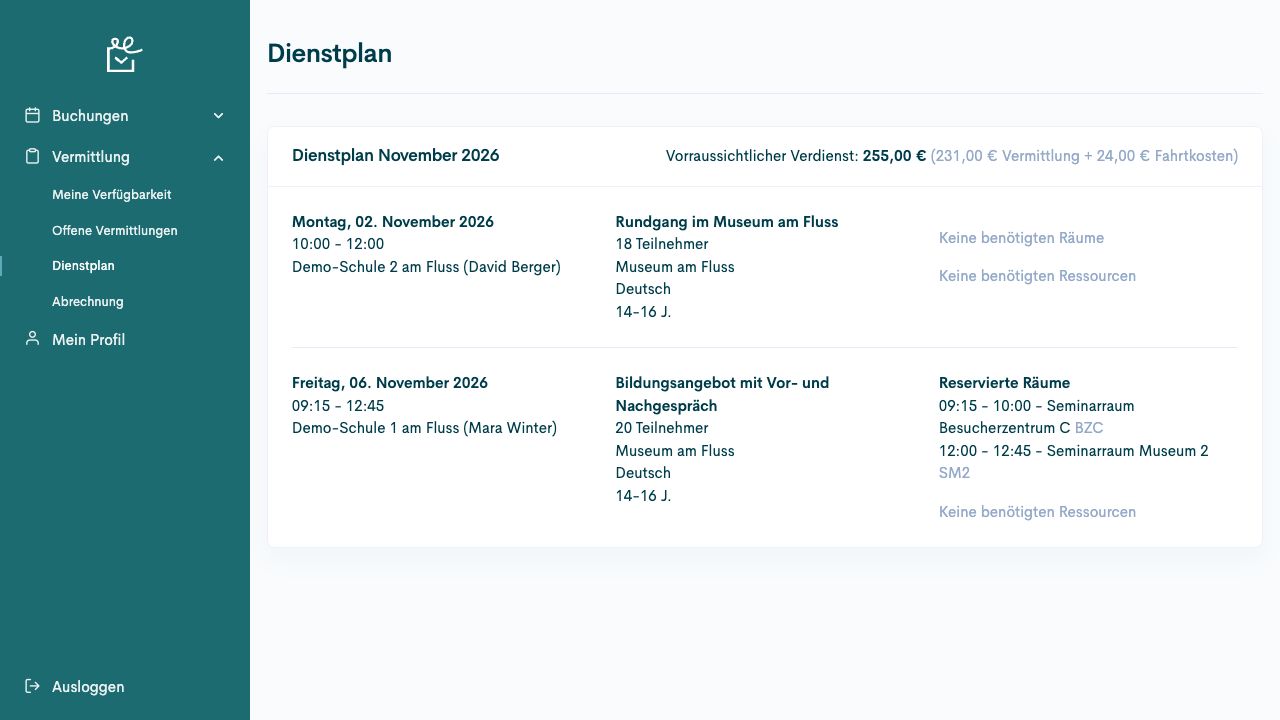
The roster in the Booking System shows your guide assignments. Check details of the offer, group, and delivery before undertaking the assignment. This guide describes the view within the Booking System.
Access and responsibility
Section titled “Access and responsibility”Open Guide coordination → Roster (Vermittlung → Dienstplan). Editing requires the appropriate permissions.
Understand the information
Section titled “Understand the information”| Information | Meaning for your work |
|---|---|
| Monthly groups | Organise assignments for the current month and future months. |
| Offer and visit time | Identify the assignment. |
| Group and participants | Describe the expected use. |
| Rooms, resources, and skills | Describe the requirements for delivery. |
| Check-in and check-out | Show the recorded delivery times. |
| Record work performed | Is used to complete appropriately configured offers. |
Context and special cases
Section titled “Context and special cases”The Booking System’s roster shows your assigned guide sessions by month. It combines visit time with the group, offer, language, age category, room phases, and required resources.
Expected earnings (Voraussichtliche Verdienst) is a calculated preview. Check services performed in the appropriate accounting period. The display does not confirm payment.
Check-in and check-out serve different purposes from correcting a work record. On the assignment day, the conditions of the respective offer apply. The responsible team processes later corrections to participants or actual travel expenses in work records.
Prepare an assigned visit
Section titled “Prepare an assigned visit”Room time slots appear with the respective visit. Check them alongside the offer, language, and participant count. The image shows fictional example data.
Check your own assignment
Section titled “Check your own assignment”Prerequisites
Section titled “Prerequisites”Required role: Assigned person with a personal account.
You know the approximate assignment date.
-
Open Guide coordination → Roster (Vermittlung → Dienstplan) in the Booking System.
-
Find the session in the assignments grouped by month. Browse through the pages if required.
-
Compare offer, date, start, end, location, language, and participant count.
-
Check group details, comments, desired skills, reserved rooms, and resources.
-
Clarify missing or conflicting details with coordination before the assignment.
Check the result
Section titled “Check the result”You have checked the correct assignment and its delivery details.
If the process differs
Section titled “If the process differs”The view contains assignments for the current month and future months. Past services are checked in work records or accounting, as applicable. Another application’s roster has its own access route.
Complete an assignment
Section titled “Complete an assignment”Prerequisites
Section titled “Prerequisites”Required role: Assigned person with a personal account.
The assignment takes place today and check-in is recorded.
-
Open the specific assignment under Guide coordination → Roster (Vermittlung → Dienstplan).
-
Check the visible Check-in and whether a Check-out already exists.
-
If Check-out is offered, perform this action after the assignment.
-
For an offer billed by actual work, select Record work performed (Aufwand erfassen) instead. Check Actual start (Tatsächlicher Start), Actual end (Tatsächliches Ende), and the required internal comment. Select Complete (Abschließen).
-
Reload the view and check the displayed check-out. Pass necessary work record corrections to the responsible team.
Check the result
Section titled “Check the result”The specific assignment shows completion. When recording work performed, the entered times are saved.
If the process differs
Section titled “If the process differs”The completion action appears only under the intended conditions. Required corrections to participant counts and travel expenses are made in work records, rather than this completion dialogue.