Preferred days off
Tell planning your preferred days off and distinguish these from approved absences.
Screenshots show the German interface. German control labels are included where needed to help you find them.
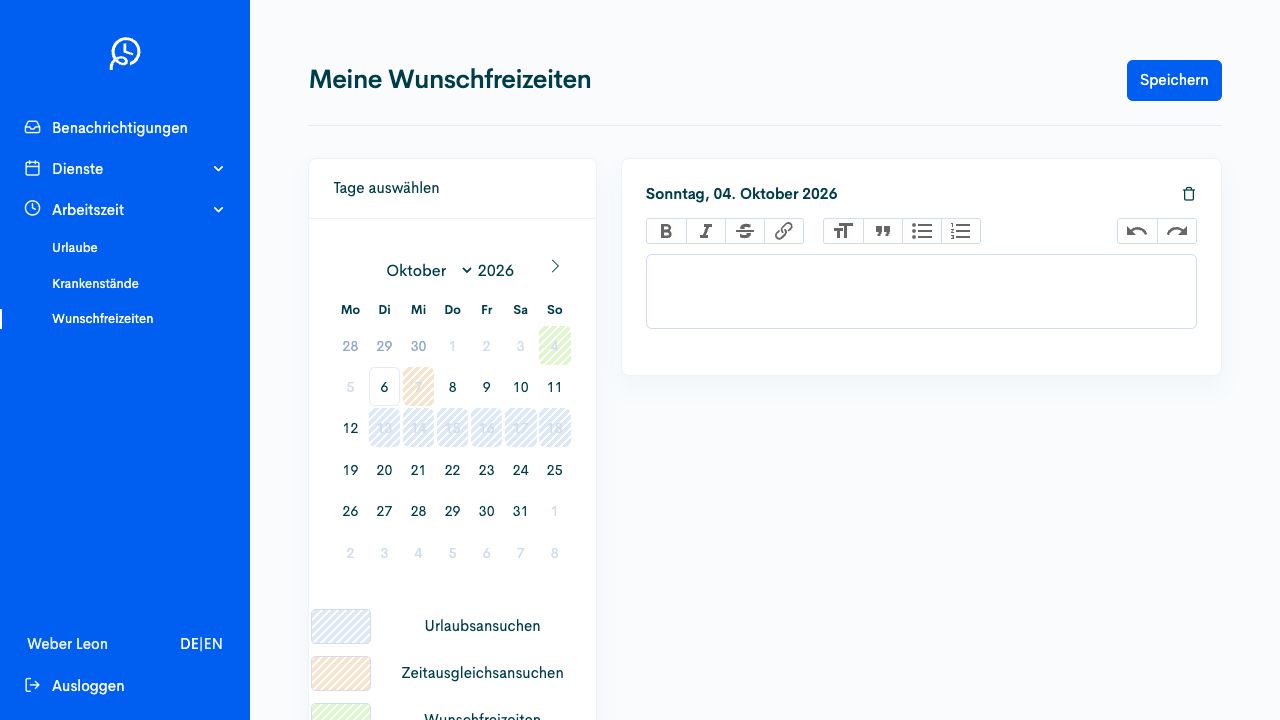
Preferred time off expresses planning preferences. It tells planning the days on which you would prefer not to be assigned. It is neither approved annual leave nor automatically booked compensatory time off.
Enter preferred days
Section titled “Enter preferred days”- Open Working time → Preferred time off (Arbeitszeit → Wunschfreizeiten) and check the person and month.
- Select the desired days in the calendar. Check annual leave and compensatory time-off requests already visible using the legend.
- Check the selection and select Save (Speichern).
- Check the saved preferred days and, later, the actual assignment in My roster (Mein Dienstplan).
Select days in the calendar. The legend distinguishes time-off preferences from other requests. The image shows fictional example data.
Add free days around annual leave
Section titled “Add free days around annual leave”The annual leave form refers to My preferred time off (Meine Wunschfreizeiten) for days before or after annual leave. Continue to request annual leave itself under Annual leave (Urlaube). The two entries have different effects and must be checked separately.