My roster
Check your shifts, month visibility, and actual times.
Screenshots show the German interface. German control labels are included where needed to help you find them.
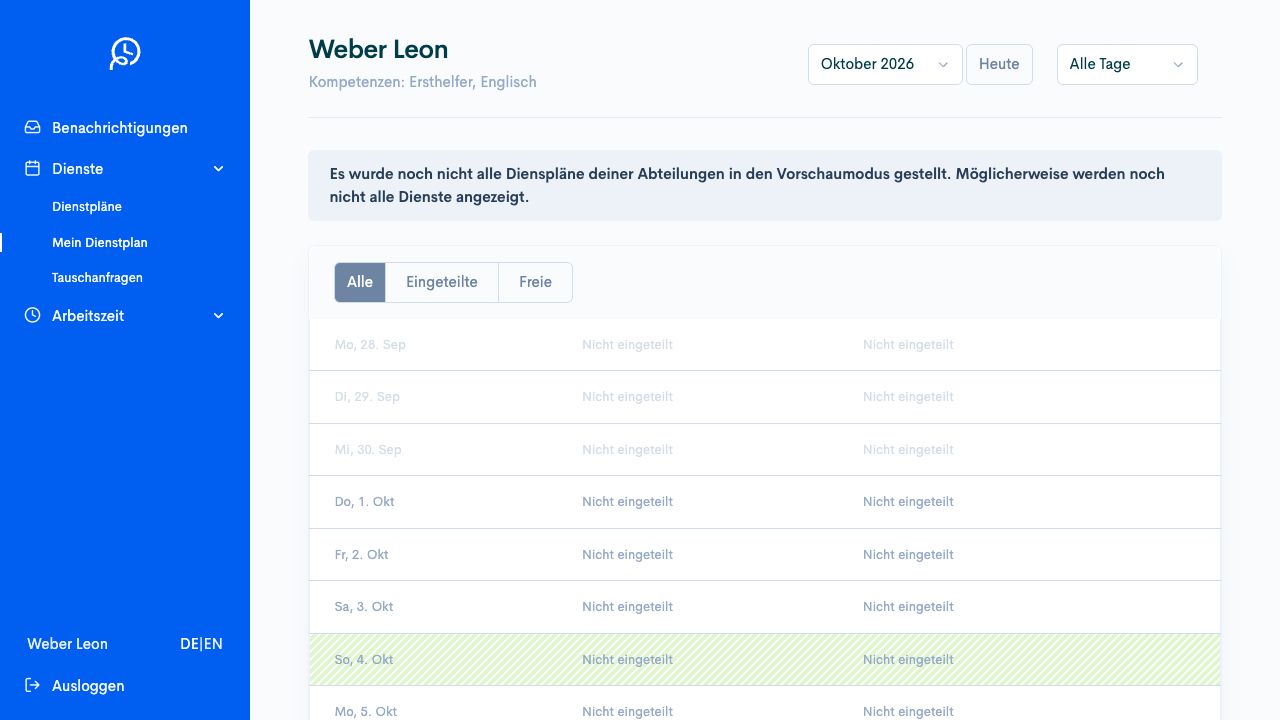
Your personal roster brings together entries from your work areas. Planning prepares and publishes departmental rosters. You check your own shifts and report discrepancies before confirming the month.
Check the whole month
Section titled “Check the whole month”Open Shifts → My roster (Dienste → Mein Dienstplan) and select the desired month. Assigned staff (Eingeteilte) hides days without entries. Free days (Freie) shows days without assignments. A filter changes no assignment and approves no absence.
If the notice about missing previews appears, the view may be incomplete. Not assigned (Nicht eingeteilt) is then no reliable promise of a day off. Have planning check the publication state of all affected departments.
The notice appears above the roster. It explains why not all shifts need be visible yet. The image shows fictional example data.
Read times and balances
Section titled “Read times and balances”Check the date, start, end, work area, and shift comment. Where displayed, balances relate to the month, quarter, year, or DRZ (working-time averaging period). Compare only the same period and planned/actual view. A displayed time credit is not a confirmed payment.
Report a discrepancy
Section titled “Report a discrepancy”For an existing shift, Change request (Änderungsansuchen) may open the route to correct actual time. Report the actual start and end with a factual note. A request that is still open is not an approved time change. Planning handles it under Discrepancies.
Monthly confirmation is offered only when the required departmental rosters are published. Check all times and open change requests beforehand. The confirmation dialogue may indicate that these requests will expire.
View and confirm your own shift times
Section titled “View and confirm your own shift times”Prerequisites
Section titled “Prerequisites”Required role: Employees with a personal account.
All required departmental rosters for the month are published. You have clarified open time changes with planning.
-
Open Shifts → My roster (Dienste → Mein Dienstplan) and select the correct month. Check any notice about incomplete rosters before treating the view as complete.
-
Use Assigned staff (Eingeteilte) to hide days without assignments. Check all shifts, times, work areas, and absences for this month.
-
Clarify missing or incorrect actual times with planning. Check open Change requests (Änderungsansuchen) before monthly confirmation.
-
Select Confirm shift times (Dienstzeiten bestätigen) when the month is complete and correct. Read the dialogue. It covers all shift times in the named month. A notice may indicate that open change requests will expire.
-
Select Confirm (Bestätigen) only after this check. Check Shift times confirmed (Dienstzeiten bestätigt) in the correct month.
Check the result
Section titled “Check the result”Your monthly confirmation is recorded. Further approval by planning is a separate step. This does not confirm payment or payroll processing.
If the process differs
Section titled “If the process differs”If the button is missing, check with planning whether all required departmental rosters are published. For later errors, use the local correction route. Do not infer binding time off from an empty row in a preview that is still incomplete.