Leave
Request annual leave and follow preliminary review, approval, and leave entries.
Screenshots show the German interface. German control labels are included where needed to help you find them.
An annual leave request records the desired period. Only the intended approval decides on it. Preferred time off on adjacent days and compensatory time off are handled in separate areas.
Find requests and annual leave entries
Section titled “Find requests and annual leave entries”Open Working time → Annual leave (Arbeitszeit → Urlaube). Depending on role, Annual leave & requests (Urlaube & Anfragen) shows your entries or people available for review. Check the selected person, period, and status filter.
Besides requests, the list may contain booked annual leave days, manual entries, and contractual or system events. Therefore, not every row represents a new decision. Use Requested (Angefragt) to handle open requests and All statuses (Alle Status) to check the history.
Distinguish approval stages
Section titled “Distinguish approval stages”Requested means submitted. Pre-approved (Vorgenehmigt) means preliminarily reviewed and not yet finally approved. Approved (Genehmigt) is the final approval status. In the checked version, the planning role can pre-approve. Final approval is reserved for another authorised role. Your organisation determines who takes these roles.
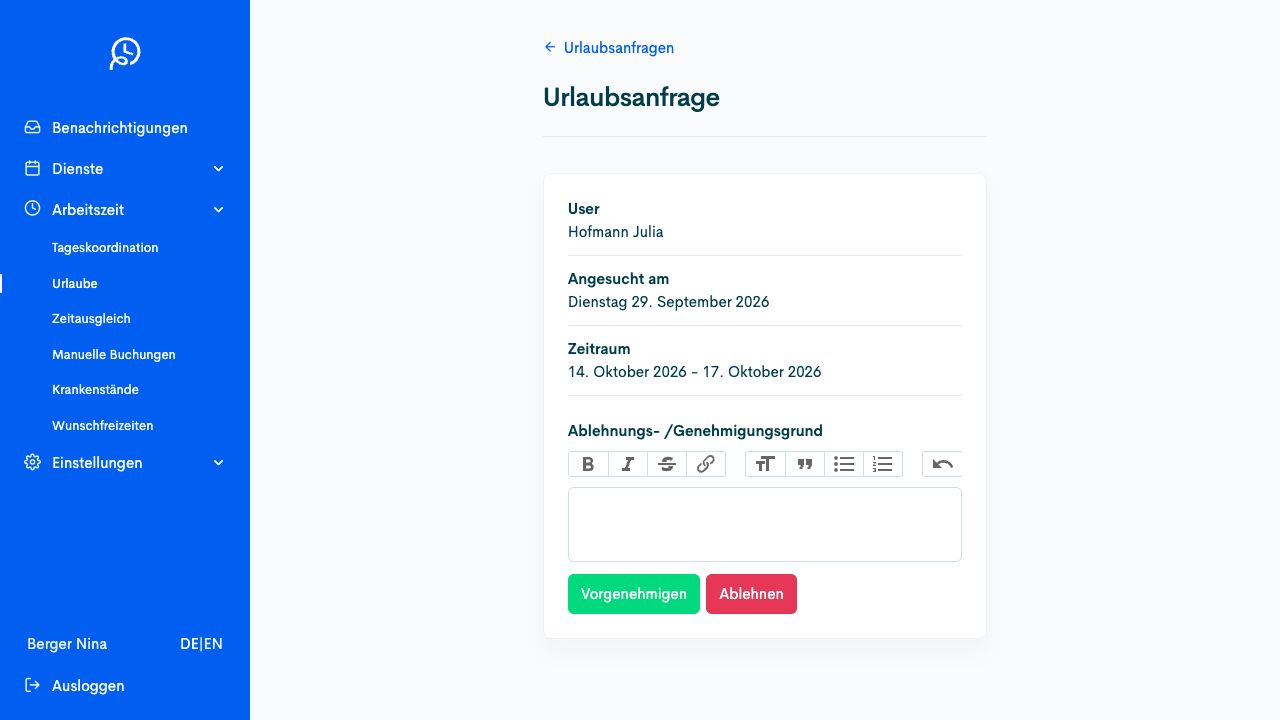
First check the person and period. The decision fields offered depend on your role. The image shows fictional example data.
Check the roster after the decision
Section titled “Check the roster after the decision”Check the request status and affected days in the roster. Approving an absence does not refill shifts that have become vacant. Planning must handle these gaps separately.
Request annual leave
Section titled “Request annual leave”Prerequisites
Section titled “Prerequisites”Required role: Employees with request permission.
You know the desired annual leave period. Check the local request route and existing requests before recording another.
-
Open Working time → Annual leave (Arbeitszeit → Urlaube) and Submit new request (Neue Anfrage stellen).
-
Under Select period (Zeitraum auswählen), select the start and end in the calendar. Compare existing requests using the legend.
-
Under Notes/Information (Notiz/Hinweise), add the details needed for review. For preferred days off before or after annual leave, use My preferred time off (Meine Wunschfreizeiten) separately.
-
Check the complete selection and select Request (Anfragen).
-
Check the saved request with the correct period and Requested (Angefragt) status. Wait for the intended final approval.
Check the result
Section titled “Check the result”The desired annual leave is recorded as a request. Pre-approved (Vorgenehmigt) is a preliminary review. Only Approved (Genehmigt) is the final approval status.
If the process differs
Section titled “If the process differs”For compensatory time off, use Compensatory time off, and for planning preferences, use Preferred time off. Report sickness through the locally intended route. If saving is unclear, find the existing request before another attempt.
Review an annual leave request
Section titled “Review an annual leave request”Prerequisites
Section titled “Prerequisites”Required role: The responsible preliminary-review or approval role.
You may carry out the relevant approval step. Preliminary review and final approval may belong to different people.
-
Open Working time → Annual leave (Arbeitszeit → Urlaube). Select the required period and Requested (Angefragt) to find open requests.
-
Open the specific request. Check the person, period, notes, and effects on existing shifts.
-
Add the required Reason for refusal / approval (Ablehnungs- /Genehmigungsgrund). Use Pre-approve (Vorgenehmigen) if your role carries out only the preliminary review, or Refuse (Ablehnen) following a justified negative decision.
-
Carry out final approval only with the intended role and the offered Approve (Genehmigen) field. Do not equate preliminary review with final approval.
-
Check the status actually reached. Check annual leave days in the roster and arrange to refill shifts that have become vacant.
Check the result
Section titled “Check the result”The request carries the correct decision status. Affected days and any open staffing positions have been checked.
If the process differs
Section titled “If the process differs”If only Pre-approve appears, this does not complete the final approval step. The next responsible role must review it. If the request is missing from the list, check the person, period, and status filter before recommending a new request.